Skip to content

huawei routerların arayüzlerinde trafik ve mib değerlerini sıfırlamak

bir arayüz üzerinden hata geliyor ve yapılan müdehaleler sonrasında sorunun devam edip etmediğini görmek istiyorsak interface sayaç değerlerini sıfırlamak işleri kolaylaştıracaktır. aşagıdaki örnek arayüzde CRC errorları dikkat çekmektedir…

[~router]display interface 50|100GE 5/1/0
50|100GE5/1/0 current state : UP (ifindex: 212)
Line protocol current state : UP 
Link quality grade : GOOD
Description: interface
Route Port,The Maximum Transmit Unit is 9212 
IP Sending Frames' Format is PKTFMT_ETHNT_2, Hardware address is 6dc4-6dc4-6dc4
Factor/Module: QSFP28, Standard: 100GBASE-LR4, FecMode: Disable
The Vendor PN is RTXM290-806
The Vendor Name is WTD
Port BW: 100G, Transceiver max BW: 100G, Transceiver Mode: SingleMode
Connector Type: LC, Transmission Distance: 10km
WaveLength: 1295.56nm 1300.05nm 1304.58nm 1309.14nm
Rx Warning range: [-10.599,  4.500]dBm, Tx Warning range: [-4.300,  4.500]dBm
Rx0 Power:  -7.40dBm, Tx0 Power:   1.57dBm
Rx1 Power:  -6.83dBm, Tx1 Power:   2.04dBm
Rx2 Power:  -6.83dBm, Tx2 Power:   1.99dBm
Rx3 Power:  -6.74dBm, Tx3 Power:   2.02dBm
Loopback: none, LAN full-duplex mode, Pause Flowcontrol: Receive Enable and Send Enable
Port Speed Switch Mode: manual
Last physical up time   : 2026-02-24 11:51:30+03:00
Last physical down time : 2026-02-24 11:49:07+03:00
Current system time: 2026-02-24 13:19:54+03:00
Statistics last cleared:2024-12-16 07:53:02+03:00
    Last 300 seconds input rate: 1477811763 bits/sec, 280550 packets/sec
    Last 300 seconds output rate: 1527603379 bits/sec, 232249 packets/sec
    Input peak rate 1477811763 bits/sec, Record time: 2026-02-24 13:19:54+03:00
    Output peak rate 1527634378 bits/sec, Record time: 2026-02-24 13:19:54+03:00
    Input: 3342830018023050 bytes, 5756490768291 packets
    Output: 6834371174146959 bytes, 8252820686074 packets
    Input:
      Unicast: 5756432761945 packets, Multicast: 58006026 packets
      Broadcast: 320 packets, JumboOctets: 405942739572 packets
      CRC: 771506832 packets, Symbol: 80511712 packets
      Overrun: 0 packets, InRangeLength: 0 packets
      LongPacket: 0 packets, Jabber: 0 packets, Alignment: 0 packets
      Fragment: 0 packets, Undersized Frame: 0 packets
      RxPause: 0 packets
    Output:
      Unicast: 8252768032451 packets, Multicast: 52653468 packets
      Broadcast: 155 packets, JumboOctets: 1274128818374 packets
      Lost: 0 packets, Overflow: 0 packets, Underrun: 0 packets
      System: 0 packets, Overruns: 0 packets
      TxPause: 0 packets
    Local fault: normal, Remote fault: normal.
    Last 300 seconds input utility rate:  1.47%
    Last 300 seconds output utility rate: 1.52%

şimdi bu verileri temizleyelim.. öncelikle konfig moddan çıkılması gerekmektedir. sonrasında reset counter komut ile ilgili arayüze ait veriler sıfırlanabilir.

[~router]quit
<router>reset counters interface 50|100GE 5/1/0
Info: This operation resets the counters in the display interface command output on this interface.
Info: Reset successfully.
<router>

şimdi kontol edelim

<router>display interface 50|100GE 5/1/0
50|100GE5/1/0 current state : UP (ifindex: 212)
Line protocol current state : UP 
Link quality grade : GOOD
Description: interface
Route Port,The Maximum Transmit Unit is 9212 
IP Sending Frames' Format is PKTFMT_ETHNT_2, Hardware address is 6dc4-6dc4-6dc4
Factor/Module: QSFP28, Standard: 100GBASE-LR4, FecMode: Disable
The Vendor PN is RTXM290-806
The Vendor Name is WTD
Port BW: 100G, Transceiver max BW: 100G, Transceiver Mode: SingleMode
Connector Type: LC, Transmission Distance: 10km
WaveLength: 1295.56nm 1300.05nm 1304.58nm 1309.14nm
Rx Warning range: [-10.599,  4.500]dBm, Tx Warning range: [-4.300,  4.500]dBm
Rx0 Power:  -7.40dBm, Tx0 Power:   1.58dBm
Rx1 Power:  -6.83dBm, Tx1 Power:   2.05dBm
Rx2 Power:  -6.83dBm, Tx2 Power:   1.97dBm
Rx3 Power:  -6.71dBm, Tx3 Power:   2.05dBm
Loopback: none, LAN full-duplex mode, Pause Flowcontrol: Receive Enable and Send Enable
Port Speed Switch Mode: manual
Last physical up time   : 2026-02-24 11:51:30+03:00
Last physical down time : 2026-02-24 11:49:07+03:00
Current system time: 2026-02-24 13:28:10+03:00
Statistics last cleared:2026-02-24 13:28:01+03:00
    Last 300 seconds input rate: 1407061768 bits/sec, 273766 packets/sec
    Last 300 seconds output rate: 1454198771 bits/sec, 222001 packets/sec
    Input peak rate 1407061768 bits/sec, Record time: 2026-02-24 13:28:10+03:00
    Output peak rate 1454872520 bits/sec, Record time: 2026-02-24 13:28:10+03:00
    Input: 1684316592 bytes, 2702946 packets
    Output: 1743681595 bytes, 2184529 packets
    Input:
      Unicast: 2702931 packets, Multicast: 15 packets
      Broadcast: 0 packets, JumboOctets: 99374 packets
      CRC: 0 packets, Symbol: 0 packets
      Overrun: 0 packets, InRangeLength: 0 packets
      LongPacket: 0 packets, Jabber: 0 packets, Alignment: 0 packets
      Fragment: 0 packets, Undersized Frame: 0 packets
      RxPause: 0 packets
    Output:
      Unicast: 2184515 packets, Multicast: 14 packets
      Broadcast: 0 packets, JumboOctets: 212072 packets
      Lost: 0 packets, Overflow: 0 packets, Underrun: 0 packets
      System: 0 packets, Overruns: 0 packets
      TxPause: 0 packets
    Local fault: normal, Remote fault: normal.
    Last 300 seconds input utility rate:  1.40%
    Last 300 seconds output utility rate: 1.45%
securecrt commands manager e komut listesi eklemek

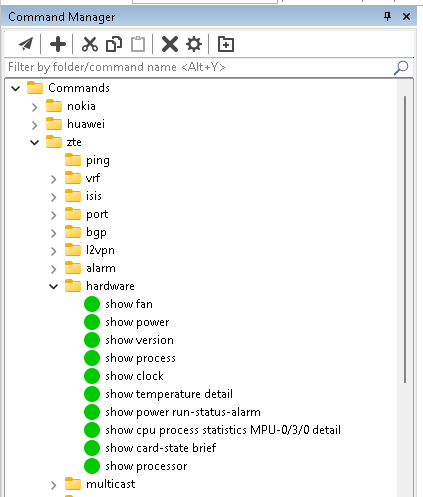
ağ yönetiminde ssh client uygulaması olarak securecrt oldukça popülerdir. eğer sizde securecrt kullanıyor ve kullanmayı planlıyorsanız network yönetimi sırasında commands manager aracı oldukça işinize yarayacaktır.

commands manager altıda istediğiniz komut tanımlamalarını yapabiliyor ve tek tıkla bu komutu aktif oturuma gönderebilirsiniz.. tasarım sırasında ağaç yapısı desteklemesi sayesinde kategorize edilmiş olarak komutları ekleyebilirsiniz…

tüm ihtiyacınız olabilecek komutları tek tek eklemez biraz yorucu olabilir.. bu noktada hazırladığım python scripti paylaşmacağım.. öncelikle ekleyeceğimiz komutları aşagıdaki formatta excel dosyasında hazırlıyoruz. vendor ve category olarak bir ağaç yapısı tasarladık.

commands.xlsx

Vendor Category Command
nokia bgp show router bgp summary
nokia bgp show router bgp neighbor
nokia switch show ethernet-service port 1/3
huawei display ip interface brief
zte show ip interface brief loopback0

xml_create.py

import pandas as pd
import xml.etree.ElementTree as ET
from xml.dom import minidom

def create_securecrt_xml(excel_file_path, output_xml_path):
    # Excel dosyasını oku ve NaN değerleri boş string ile değiştir
    df = pd.read_excel(excel_file_path).fillna("")
    
    # Ana XML yapısını oluştur
    root = ET.Element("VanDyke", version="3.0")
    commands_root = ET.SubElement(root, "key", name="Commands")
    
    # Vendor gruplarına göre işle
    for vendor in df["Vendor"].unique():
        if not vendor:  # Vendor boşsa atla
            continue
            
        vendor_key = ET.SubElement(commands_root, "key", name=str(vendor))
        
        # Kategoriye göre komutları grupla
        vendor_data = df[df["Vendor"] == vendor]
        for category in vendor_data["Category"].unique():
            if pd.isna(category) or category == "":  # Kategori boşsa genel komutlara ekle
                continue
                
            category_data = vendor_data[vendor_data["Category"] == category]
            category_key = ET.SubElement(vendor_key, "key", name=str(category))
            commands_key = ET.SubElement(category_key, "key", name="__Commands__")
            default_array = ET.SubElement(commands_key, "array", name="Default")
            
            # Komutları ekle
            for _, row in category_data.iterrows():
                if not row["Command"] or pd.isna(row["Command"]):
                    continue
                command_str = f"SEND,{row['Command']},{row['Command']},,,0,1,{row['Command']},"
                ET.SubElement(default_array, "string").text = command_str
        
        # Vendor için genel komutlar (kategori yoksa)
        general_commands = vendor_data[vendor_data["Category"].isna() | (vendor_data["Category"] == "")]
        if not general_commands.empty:
            commands_key = ET.SubElement(vendor_key, "key", name="__Commands__")
            default_array = ET.SubElement(commands_key, "array", name="Default")
            for _, row in general_commands.iterrows():
                if not row["Command"] or pd.isna(row["Command"]):
                    continue
                command_str = f"SEND,{row['Command']},{row['Command']},,,0,1,{row['Command']},"
                ET.SubElement(default_array, "string").text = command_str
    
    # XML'i düzgün formatla ve kaydet
    xml_str = ET.tostring(root, encoding="utf-8")
    dom = minidom.parseString(xml_str)
    # toprettyxml encoding="utf-8" belirtilirse bytes döndürür, biz manuel yazıyoruz
    body = dom.toprettyxml(indent="\t")
    # toprettyxml'in ürettiği ilk satırı (<?xml ...?>) çıkar, yerine istediğimizin koy
    lines = body.splitlines()
    lines[0] = '<?xml version="1.0" encoding="UTF-8"?>'
    # Boş satırları temizle (toprettyxml bazen ekstra boş satır ekler)
    clean_lines = [l for l in lines if l.strip() != ""]
    pretty_xml = "\n".join(clean_lines) + "\n"
    
    with open(output_xml_path, "w", encoding="utf-8") as f:
        f.write(pretty_xml)

if __name__ == "__main__":
    excel_file_path = "commands.xlsx"  # Excel dosyası yolu
    output_xml_path = "securecrt_commands.xml"  # Çıktı XML dosyası yolu
    create_securecrt_xml(excel_file_path, output_xml_path)
    print(f"XML dosyası oluşturuldu: {output_xml_path}")

excel ve python dosyasını ayını dizinde olacak şekilde çalıştırırsak aynı dizinde securecrt_commands.xml adından bir xml dosyası oluşturulacaktır.

<?xml version="1.0" encoding="UTF-8"?>
<VanDyke version="3.0">
	<key name="Commands">
		<key name="nokia">
			<key name="bgp">
				<key name="__Commands__">
					<array name="Default">
						<string>SEND,show router bgp summary,show router bgp summary,,,0,1,show router bgp summary,</string>
						<string>SEND,show router bgp neighbor,show router bgp neighbor,,,0,1,show router bgp neighbor,</string>
					</array>
				</key>
			</key>
			<key name="switch">
				<key name="__Commands__">
					<array name="Default">
						<string>SEND,show ethernet-service port 1/3,show ethernet-service port 1/3,,,0,1,show ethernet-service port 1/3,</string>
					</array>
				</key>
			</key>
		</key>
		<key name="huawei">
			<key name="__Commands__">
				<array name="Default">
					<string>SEND,display ip interface brief,display ip interface brief,,,0,1,display ip interface brief,</string>
				</array>
			</key>
		</key>
		<key name="zte">
			<key name="__Commands__">
				<array name="Default">
					<string>SEND,show ip interface brief loopback0,show ip interface brief loopback0,,,0,1,show ip interface brief loopback0,</string>
				</array>
			</key>
		</key>
	</key>
</VanDyke>

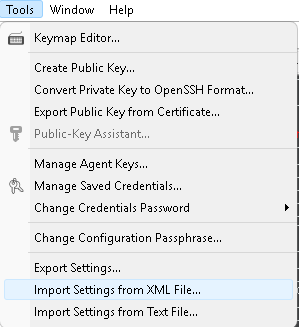
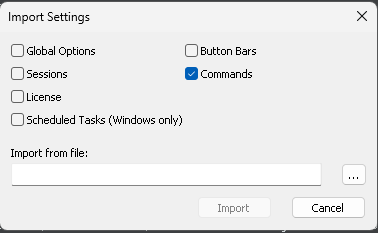
xml dosyası oluşturktan sonra aşagıdaki adımları izlerek xml dosyasını securecrt içine import edeceğiz.

github deposu için

https://github.com/ferhatcicek/securecrt-commands-manager-xml-create

zte routerlarda aktif alarmları izleme

alarmları izlemek için kullanılacak en temel komut “show router current

router_zte_test(config)#show alarm current 
An alarm 612603 ID 109847 level 2 occurred at 16:56:23 02-08-2026 sent by router_zte_test PFU-1/4/0 %PORT% Receiving Optical Power(dBm) threshold crossed  (Interface:sat_xgei-1/4/0/10,lane = NA). 15min low alarm forecast occur. Warn Low thres is: -16.9900, current value is: -18.7289@Satellite-1
An alarm 612603 ID 109818 level 2 occurred at 16:52:31 02-08-2026 sent by router_zte_test PFU-1/5/0 %PORT% Receiving Optical Power(dBm) threshold crossed  (Interface:sat_xgei-1/5/0/7,lane = NA). 15min low alarm occur. Low thres is: -19.0000, current value is: -26.3827@Satellite-1
An alarm 612615 ID 108432 level 5 occurred at 15:51:12 02-05-2026 sent by router_zte_test PFU-1/1/0 %PORT% Missing Optical Module!  (sat_xgei-1/1/0/2: Optical Module is not installed)@Satellite-1
An alarm 612615 ID 108384 level 5 occurred at 15:43:27 02-05-2026 sent by router_zte_test PFU-1/1/0 %PORT% Missing Optical Module!  (sat_xgei-1/1/0/3: Optical Module is not installed)@Satellite-1
An alarm 612615 ID 108362 level 5 occurred at 15:36:57 02-05-2026 sent by router_zte_test PFU-1/1/0 %PORT% Missing Optical Module!  (sat_xgei-1/1/0/1: Optical Module is not installed)@Satellite-1
An alarm 50901 ID 108348 level 2 occurred at 15:36:26 02-05-2026 sent by router_zte_test MPU-0/4/0 %LACP% LACP interface active status.  The interface (index = 8309, name = xgei-0/1/0/19) turns into INACTIVE. (Reason:Negotiation failed or cannot meet the conditions)
An alarm 612615 ID 85382 level 5 occurred at 13:36:06 12-16-2025 sent by router_zte_test PFU-2/6/0 %PORT% Missing Optical Module!  (sat_xgei-2/6/0/6: Optical Module is not installed)@Satellite-2
An alarm 612615 ID 85376 level 5 occurred at 13:36:02 12-16-2025 sent by router_zte_test PFU-2/6/0 %PORT% Missing Optical Module!  (sat_xgei-2/6/0/7: Optical Module is not installed)@Satellite-2
An alarm 612615 ID 85374 level 5 occurred at 13:35:58 12-16-2025 sent by router_zte_test PFU-2/6/0 %PORT% Missing Optical Module!  (sat_xgei-2/6/0/8: Optical Module is not installed)@Satellite-2
An alarm 612615 ID 85372 level 5 occurred at 13:35:54 12-16-2025 sent by router_zte_test PFU-2/6/0 %PORT% Missing Optical Module!  (sat_xgei-2/6/0/9: Optical Module is not installed)@Satellite-2

Back To Top